Sending emails with queue jobs in laravel 11 with fortify authentication

By Wabnev, Published on August 29th 2024 | 3 mins, 440 words
Laravel Fortify is a frontend-agnostic authentication backend implementation for Laravel. It provides the necessary routes and controllers to handle various authentication features without dictating a specific user interface. Here are some key aspects of Laravel Fortify:
Key Features
- Authentication: Handles user login and logout processes.
- Registration: Manages user registration, including validation and user creation.
- Password Reset: Provides functionality for users to reset their passwords.
- Email Verification: Supports email verification to ensure users have valid email addresses.
- Two-Factor Authentication: Adds an extra layer of security by requiring a second form of authentication.
- Password Confirmation: Ensures sensitive actions are protected by requiring users to confirm their password.
How It Works
Fortify registers the routes and controllers needed to implement these authentication features. Since it doesn’t provide its own user interface, it is designed to be paired with your custom frontend or another package like Laravel Breeze, which offers a pre-built UI.
In general, Laravel handles sending emails on its own after you have configured the mailing credentials. However, it will take 5 seconds or more to send an email. This is where Laravel queue jobs comes into the party. Laravel queues enables you to seamlessly dispatch a job for sending the email while the user is redirected to the web-application.
This tutorial will include Laravel Jetstream as the starter kit. After installing Jetstream and ensuring that it is working, you follow these steps:
Step 1:
Navigate into the User Model (App\Models\User.php) and implement "MustVerifyEmail.

Step 2:
Create a "SendVerifyEmail" job via the command (from your application directory).
--- php artisan make:job SendVerifyEmail
Step 3:
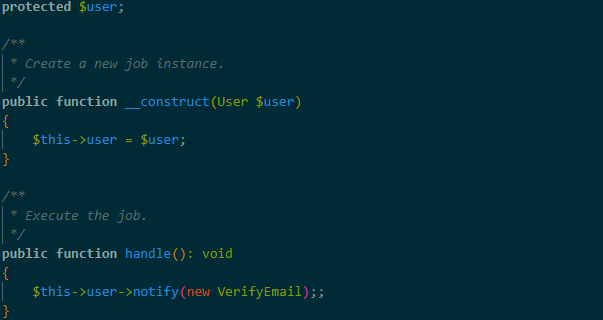
Navigate into the "SendVerifyEmail" file (App\Jobs\SendVerifyEmail.php) and update it as follows.

Then.
Step 4:
Update the "MustVerifyEmail" file to dispatch the job instead of sending the email (vendor\laravel\framework\src\Illuminate\Auth\
MustVerifyEmail.php).
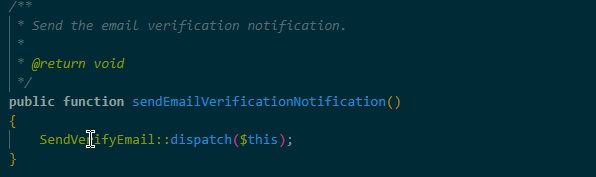
We are using "$this" to refer to the current object, which is in-fact "$user" inside the job.
Step 5:
Now that we are done configuring, we have to start our queue worker.
--- php artisan queue:work
But before starting the queue work, it is best to note that the queue is automatically setup to use your database. However, you can also use Redis for faster processing.
In, conclusion, the integration of queue jobs for email sending in Laravel 11, along with Fortify authentication, provides a powerful framework for building modern, responsive web applications. This approach not only enhances performance but also ensures that your application can handle increased load and complexity as it grows. We have demonstrated how you can easily use queue jobs to send verification emails without making things hectic. Hope you enjoyed reading.